

NovaGuard › Produktdokumentation › NovaGuard 6.04R4 User Manual › 4.6.5.1 Application Blacklists
4.6.5.1 Application Blacklists
To manage application blacklists, go to Policies - App Control - Application Blacklists, as shown in the following figure.

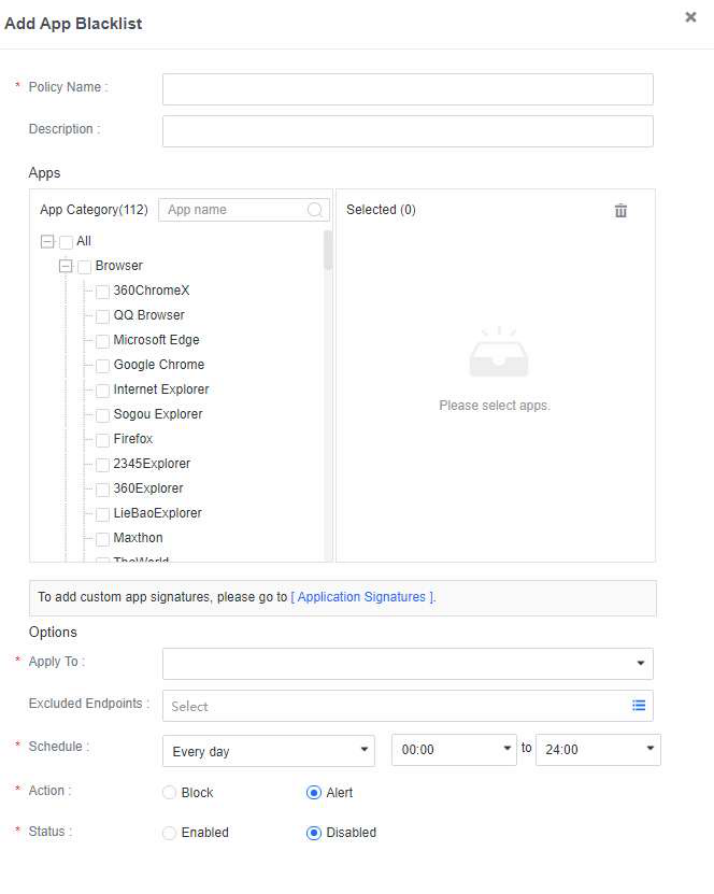
Click New to create an application blacklist. You can add applications to the blacklist, and specify endpoints to which the blacklist applies, the schedule of the blacklist takes effect, and the action to take when a blacklisted application
is detected, as shown in the following figure.
Note:
Software uninstallation is supported only for endpoints that run Windows 7 and later or
Windows Server 2012 and later.

NovaGuard 6.04R4 Manual.pdfPDF · Englisch · 24,1 MB
Herunterladen