4.6.5.3 Metering Policies
You can specify software metering policies. NovaGuard automatically collects the operation statistics of metered software on all managed endpoints. If you have configured an email notification, NovaGuard sends you an email in case
of insufficient license, unauthorized software use, or license expiration.
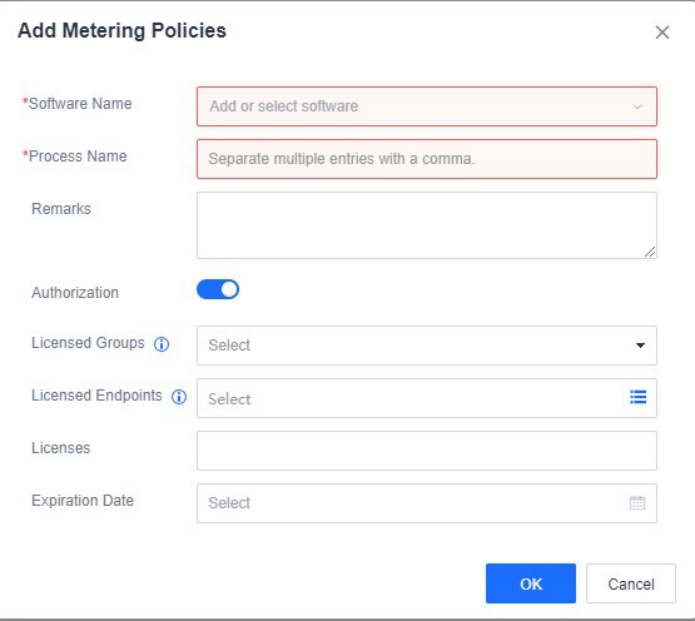
You can click New and set the following parameters to create a metering policy:
Software Name : The name of the software.
Process Name : The name of the process file. If two process names are the same, the number of executions and usage duration of the corresponding software are repeatedly metered.
Authorization : Enable it to trigger license-related alerts rather than limiting the software usage on endpoints. You can fill in the information as needed. Enable this on specific endpoints only.
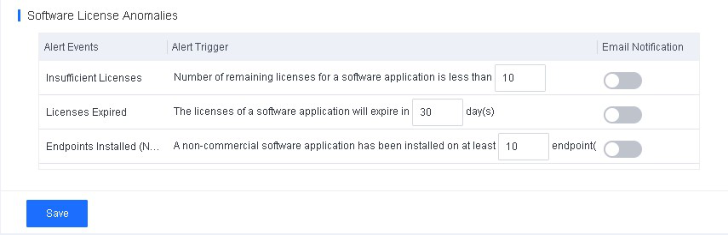
You can click License Alert Settings to configure alert settings on events such as insufficient license, license expiration, and use of non-commercial software.
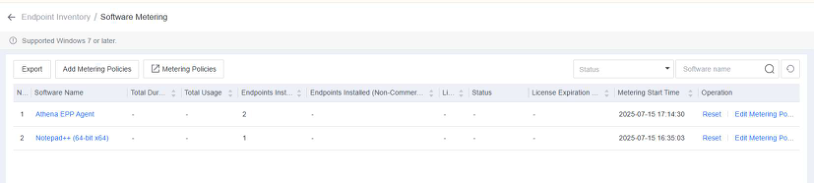
After you save the settings, you can go to Endpoints - Endpoint Inventory Office PCs - Software Metering to view the software metering information in columns such as Total Duration, Total Usages, Endpoints Installed, Endpoints Installed (Non-Commercial), Licenses, Status, License Expiration Date, and Metering Start Time .