

4.7.9.1 General
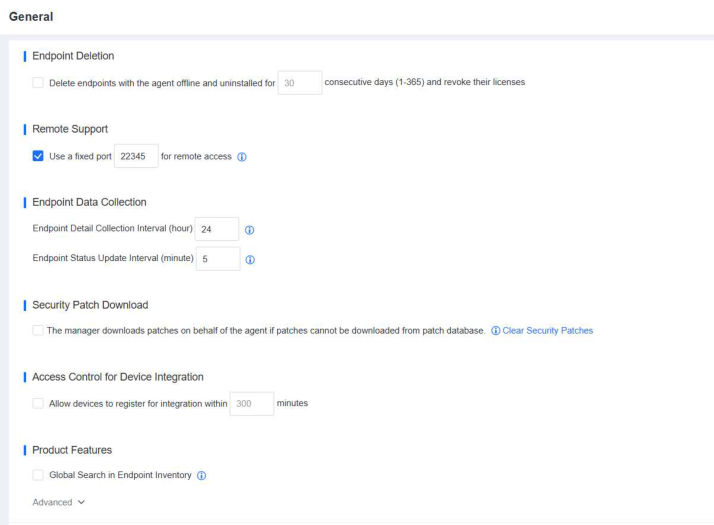
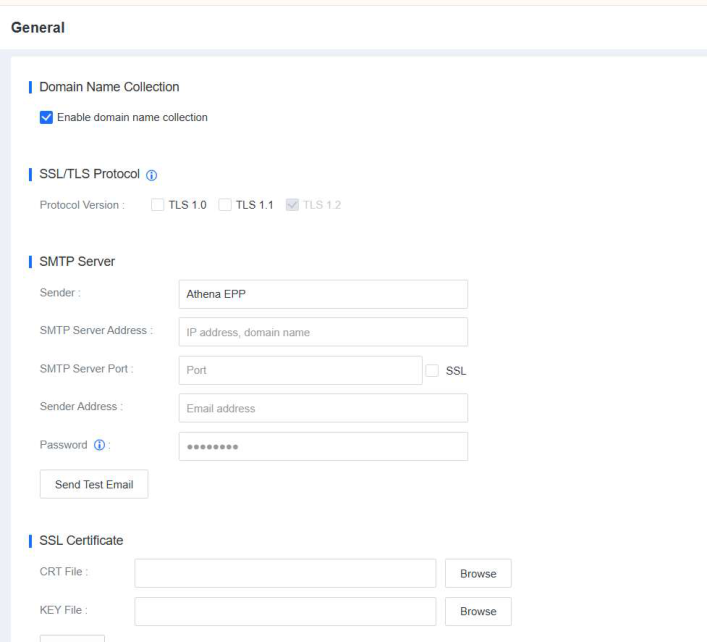
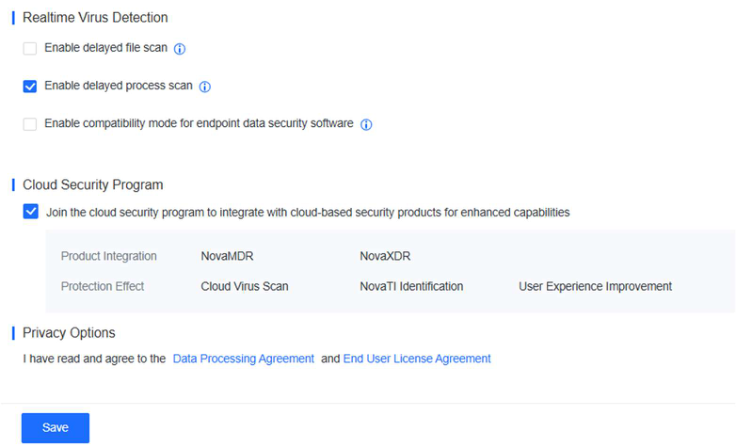
On the General page, you can configure basic system settings, including Date and Time, Time Zone, Password Security Policies, Session Timeout Logout, Endpoint Deletion, Remote Support, Endpoint Data Collection, Security
Patch Download, Access Control for Device Integration, Product Features, Domain Name Collection, SSL/TLS Protocol, SMTP Server, SSL Certificate, Realtime Virus Detection, Cloud Security Program, and Privacy Options, as shown in the following figures.
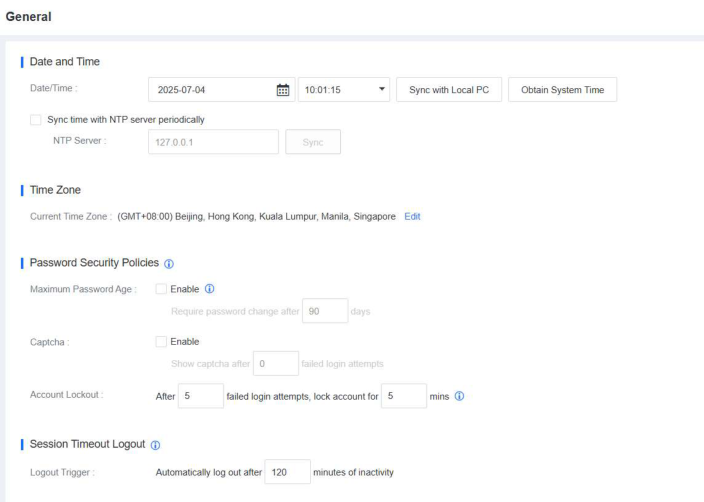
- Date and Time : Customize the time of the NovaGuard manager. You can click Sync with Local PC to synchronize the time from the local computer, or click Obtain System Time to obtain the time of the server where the NovaGuard manager is installed. If the NovaGuard manager can access the Internet, you can select Sync time with NTP server periodically to
synchronize the time of the NovaGuard manager with the specified NTP server.
-
Time Zone : Click Edit to modify the time zone of the NovaGuard manager. The time zone of the Chinese mainland is GMT+08:00.
-
Password Security Policies : Configure password security policies, including password expiration period, CAPTCHA verification, and automatic account lockout after a specific number of failed login attempts within a specified time period.
-
Session Timeout Logout : Automatically log out a user if the user stays inactive for a specific number of minutes without performing any operations on the NovaGuard manager.
-
Endpoint Deletion : Select whether to automatically delete an endpoint from the NovaGuard manager and revoke its license if the endpoint stays offline for a specific number of consecutive days.
-
Remote Support : Specify the fixed port for remote access in NovaGuard. Through the fixed port, remote control can be implemented.
-
Endpoint Data Collection : Specify the time interval for endpoint data collection for the Endpoint Inventory module, with a value range from 4 to 168 hours, as well as the time interval for endpoint status updates, with a value range from 3 to 10 minutes.
-
Security Patch Download : If the NovaGuard agent cannot download security patches due to lack of access to the Internet, the NovaGuard manager can download the security patches on behalf of the agent. Then, the agent downloads the security patches from the NovaGuard manager.
-
Access Control for Device Integration : Specify the maximum period within which devices integrated with NovaGuard are allowed to access the NovaGuard manager. To ensure the access security of integrated devices such as NovaXDR, and NovaMDR, the integrated devices can access the NovaGuard manager only within the specified period when this check box is selected.
-
Product Features : Select whether to enable or disable specific product features, including Global Search in Endpoint Inventory, Snapshot- Based Ransomware Recovery, Advanced Threat Detection and Response, App Blacklist, Software Uninstallation, Unauthorized
Outbound Access Detection, and Cleanup . If you enable these features, business continuity on endpoints may be affected. By default, these features are disabled.
-
Domain Name Collection : If you enable this feature, the NovaGuard manager records the processes that access malicious domain names. This feature can be used with botnet and malicious domain name forensics and global threat identification.
-
SSL/TLS Protocol : Protocol versions include TLS 1.0, TLS 1.1, and TLS 1.2. By default, TLS 1.2 is enabled because it is more secure than TLS 1.0 and TLS 1.1. To integrate NovaGuard with other devices, you must select TLS 1.0 and TLS 1.1.
-
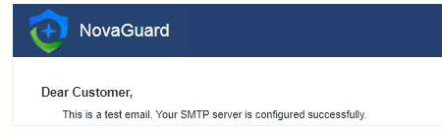
SMTP Server : Configure the SMTP server to send subscription and alert emails. Click Send Test Email to check whether the SMTP server is properly configured. If the configuration is successful, the specified administrator will receive a test email, as shown in the following figure.
-
SSL Certificate : Support exporting custom SSL certificates to NovaGuard to achieve more secure access.
-
Realtime Virus Detection : Select whether to enable delayed file scan and delayed process scan. We recommend that you enable delayed file scan if NovaGuard conflicts with other software in terms of file exclusivity. After it is enabled, the virus scan on a file will be delayed by 2 seconds when it is detected that the file is being written to the disk. We recommend that you enable delayed process scan if encryption software exists. After it is enabled, the virus scan on the files associated with a process will be delayed by 2 seconds when it is detected that the process is being started.
-
Cloud Security Program : If Join the cloud security program to integrate with cloud-based security products for enhanced capabilities and Allow internet-connected endpoints to upload virus- infected files to the cloud for improved detection of threats such as
ransomware are selected, NovaGuard will collect suspicious files to the cloud for analysis to provide better security services. Make sure that the NovaGuard manager is accessible at https://clt.forenova.com.
