

2.3.1.2 Scenarios
Scenario 1: The network bandwidth between the NovaGuard manager and NovaGuard agent is insufficient, and the bandwidth of the egress interface for Internet access is also insufficient.
Policy for NovaGuard agent : Update the NovaGuard agent and databases based on P2P deployment to reduce the bandwidth usage between the NovaGuard manager and the office network. Implement this policy first on non-critical business endpoints and then on critical business endpoints.
Policy settings for the NovaGuard manager :
-
Do not select Download resources from the ForeNova server first .
-
Select critical business endpoints for Non-distribution Endpoints.
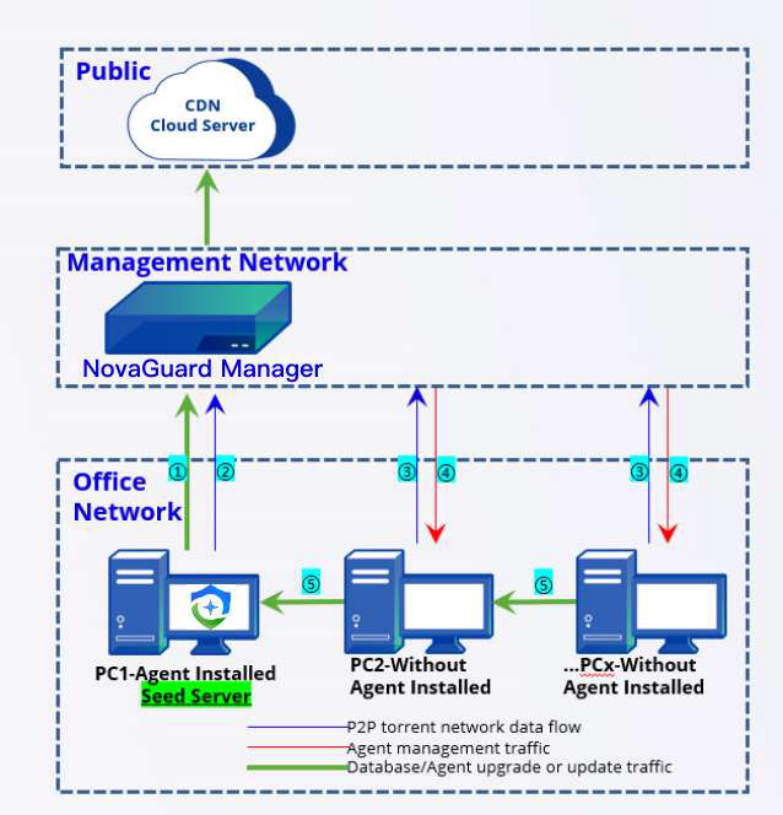
Establishment of a seed node network for P2P deployment:
-
PC 1: Obtains the databases and upgrade package of the NovaGuard agent from the NovaGuard manager during the installation of NovaGuard.
-
PC 1: Sends a request to the NovaGuard manager to become a seed node after the installation. NovaGuard manager: Adds PC 1 to the seed node list.
-
PC 2: Checks with the NovaGuard manager to determine whether seed nodes are in the seed node list during the installation of NovaGuard.
-
NovaGuard manager: Queries the seed node list. If a seed node is in the same network segment (such as PC 1), the NovaGuard manager pushes down the P2P policy for PC 2 to download resources from PC 1.
-
PC 2: Downloads the databases and the upgrade package from PC 1 after receiving the P2P policy, starts the installation, and repeats Step 2.
Scenario 2: The bandwidth of the dedicated network or VPN between the headquarters and a branch is insufficient, but the bandwidth of the egress interface for Internet access at the branch is sufficient.
Policy for the NovaGuard agent: Update the NovaGuard agent and databases based on P2P deployment to reduce the bandwidth usage between the headquarters and the branch. Implement this policy first on non-critical business endpoints and then on critical business endpoints.
Policy settings for the NovaGuard manager:
-
Do not check Download resources from ForeNova server first .
-
Specify critical business endpoints for Excluded IP Addresses to avoid business interruption caused by excessive Internet bandwidth usage during NovaGuard agent upgrade.
-
Select critical business endpoints for Non-distribution Endpoints.
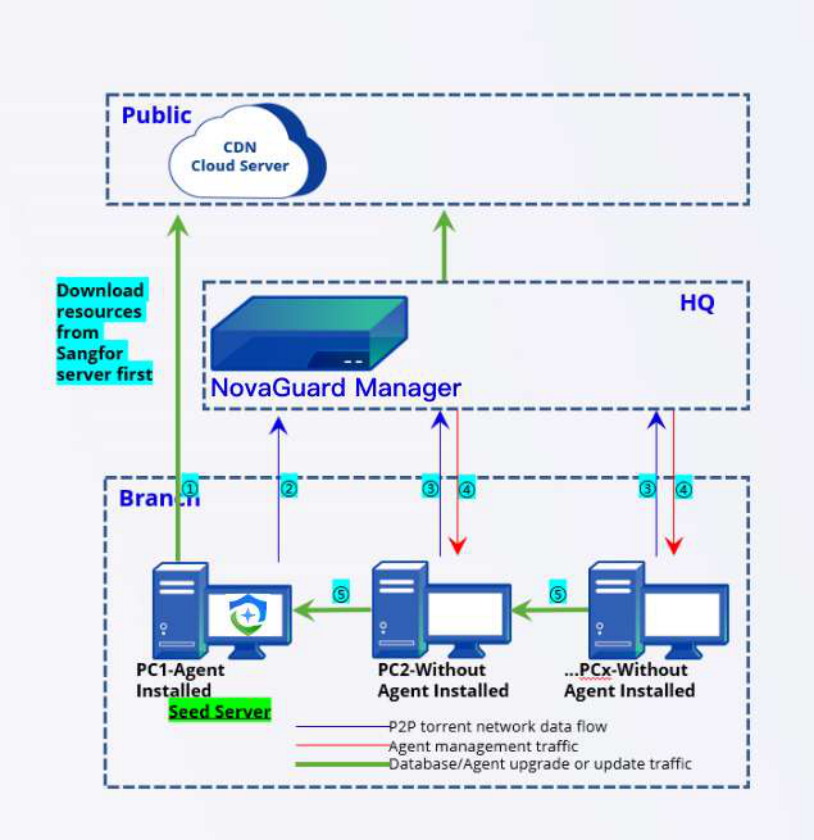
Establishment of a seed node network for P2P deployment:
-
PC 1: Obtains the databases and upgrade package of the NovaGuard agent from the ForeNova server during the installation of NovaGuard.
-
PC 1: Sends a request to the NovaGuard manager to become a seed node after the installation. NovaGuard manager: Adds PC 1 to the seed node list.
-
PC 2: Checks with the NovaGuard manager to determine whether seed nodes are in the seed node list during the installation of NovaGuard.
-
NovaGuard manager: Queries the seed node list. If a seed node is in the same network segment (such as PC 1), the NovaGuard manager pushes down the P2P policy for PC 2 to download resources from PC 1.
-
PC 2: Downloads the databases and the upgrade package from PC 1 after receiving the P2P policy, starts the installation, and repeats Step 2.
Comparison of the two scenarios:
-
Similarities between Scenario 1 and Scenario 2: Both scenarios have limited bandwidth between the headquarters and branches. Seed nodes are created based on P2P deployment during the early policy implementation stage, reducing the bandwidth usage of the dedicated network or VPN.
-
Advantages of Scenario 2 over Scenario 1: Using Download resources from ForeNova server first can distribute most of the traffic to the branch's egress interface for Internet access during the early stage, avoiding the impact of excessive bandwidth usage of the dedicated network or VPN on business systems. Adding the IP addresses of critical business systems in Excluded IP Addresses can prevent the impact of excessive Internet bandwidth usage on public access to these essential business systems.
