

2.3.3.4 Installation via the Linux Bulk Deployment Tool
1. Introduction to the tool
ForeNova provides a tool that connects to Linux servers in bulk using the SSH protocol for automatic installer download from the NovaGuard manager and bulk NovaGuard agent deployment on Linux.
2. The operating environment for the tool a) Windows
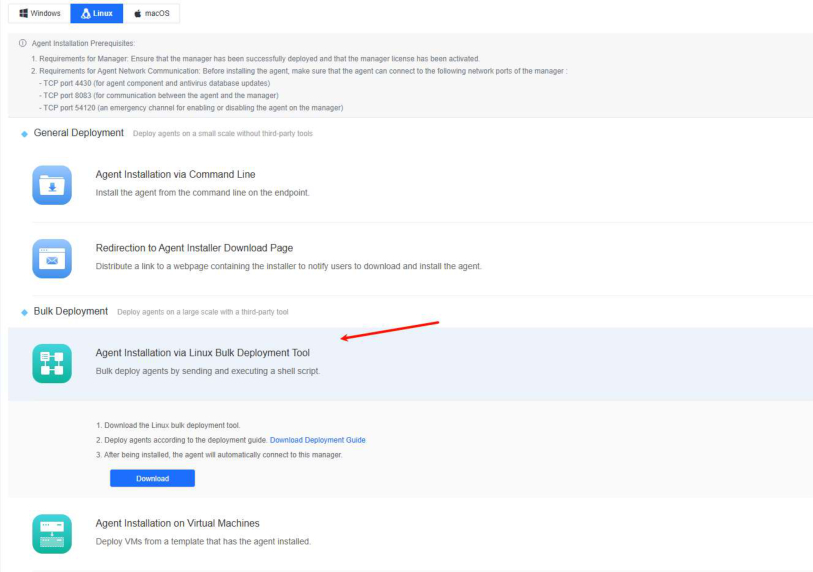
3. Requirements: a) Collect the root account usernames and passwords of all Linux servers in advance. b) The Windows PC that hosts the tool can connect to the Linux servers where the NovaGuard agent is to be installed via the SSH protocol. 4. Procedure: a) Download the tool. Go to System - Agent Deployment - Agent Download, select Linux, click Agent Installation via Linux Bulk Deployment Tool in Bulk Deployment, and click Download and Download Deployment Guide, as shown in the following figure.
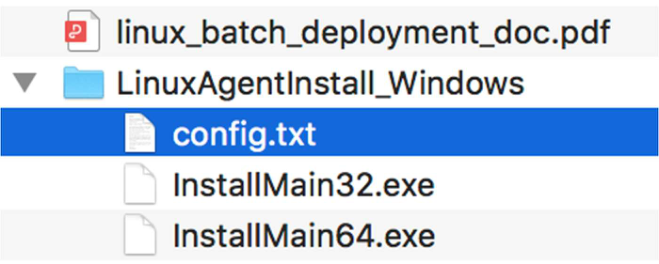
b) As shown in the following figure, the tool consists of a configuration file named config.txt and two main programs named InstallMain32.exe and InstallMain64.exe that run on 32-bit Windows and 64-bit Windows.
c) Edit the configuration file.
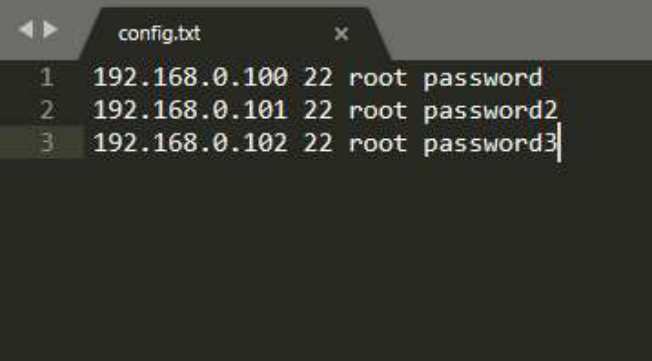
Add the collected root account usernames and passwords of the Linux servers where the NovaGuard agent is to be installed to config.txt in the format of " Linux_IP SSH_port username password ", as shown in the following figure.
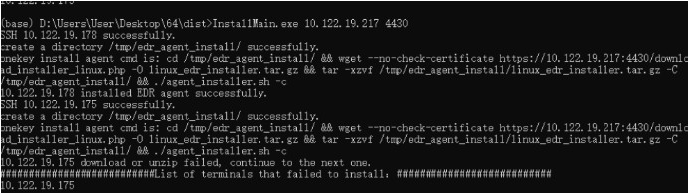
d) Run the tool. Run InstallMain64.exe or InstallMain32.exe . For example, to run InstallMain64.exe, execute " InstallMain64.exe [Manager IP] ", as shown in the following figure.
e) Verify the installation.
Wait for 10 to 30 minutes for the installation to finish. The installation
duration varies with the number of endpoints where the NovaGuard agent is being concurrently installed. Once the NovaGuard agent is installed successfully, you can find the online Linux servers on the Endpoint - Endpoint Groups page of the NovaGuard manager.
Note:
- Put the configuration file and InstallMain64.exe in the same directory, and keep the
configuration file name to " config.txt ".
- During the bulk installation via the deployment tool, Linux servers will download the
NovaGuard agent installer from NovaGuard manager. Limit the number of endpoints to
avoid excessive bandwidth usage due to bulk installation and ensure stability. If the
bandwidth is 100 Mbit/s, limit the number of endpoints to 5 in a bulk installation. If the
bandwidth is 1,000 Mbit/s, limit the number of endpoints to 60 in a bulk installation.
- After the installation is complete, clear the content of config.txt and delete the file to avoid
password leakage.
