

4.5.2.14 OS
On the OS page, you can view the summary and details of operating systems on all endpoints as an administrator, as shown below.
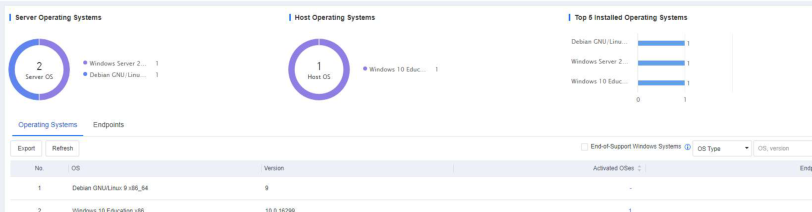
The page includes the following elements:
- Distribution of different versions of server operating systems, distribution of different versions of host operating systems, and top 5 installed
operating systems.
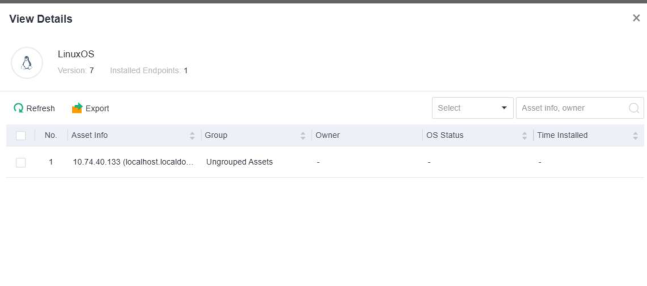
In the Operating Systems tab, you can view the number of activated operating systems and endpoints with the corresponding operating system installed. You can click the number in the Activated OSes or Endpoints column to view details or click Export to export the operating system information in Excel format, as shown in the following figure.
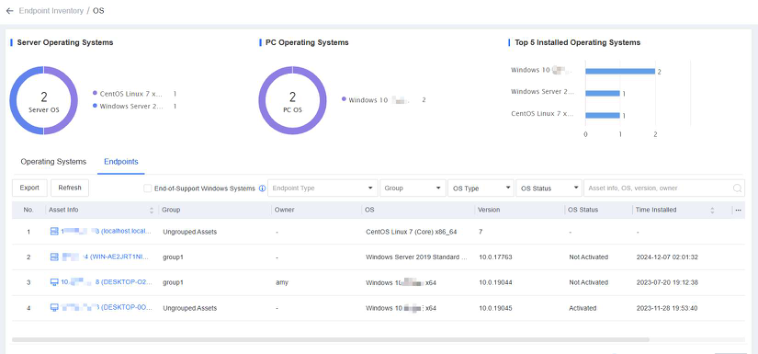
- In the Endpoints tab, you can view endpoint details such as the endpoint IP address, group, operating system type, operating system version, operating system status, installation time, and asset user, as shown in the following figure.
Note:
You can click Export to export the details in an Excel file for further analysis as an
administrator.
You can filter endpoints by endpoint type, group, operating system type, or status or directly
search endpoints in the search box.
