4.6.1.3 Realtime Protection
On this tab, you can configure settings such as Auto-Fix of High Confidence Events, Realtime File Protection, Hacktool Protection, WebShell Detection, Brute-Force Attack Detection, Suspicious Login Detection, and Fileless Attack Protection .

Note:
You can click the icon on the right of a setting to lock it and prevent it from being modified on the NovaGuard agent.
Auto-Fix of High Confidence Events
This feature can automatically analyze and fix advanced threats, skip core processes and business processes of the operating system, and automatically terminate processes of events identified as threats.

Realtime File Protection
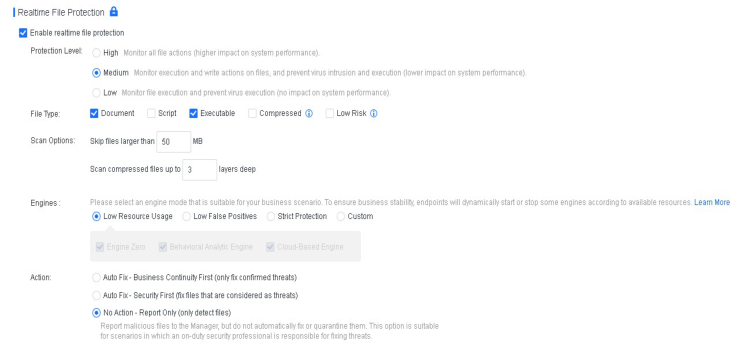
You can enable real-time file protection to monitor the read, write, and execution actions on files within an endpoint. It can prevent the impact of malicious files on the endpoint, as shown in the following figure.
Relevant parameters are described as follows:
Protection Level : Three protection levels are available against malicious files, with the following differences:
-
High : Monitor all file actions (higher impact on system performance).
-
Medium : Monitor execution and write actions on files, and prevent virus intrusion and execution (lower impact on system performance).
-
Low : Monitor file execution and prevent virus execution (no impact on system performance).
File Type : Available options include Document, Script, Executable, Compressed, and Low Risk .
Note:
-
A total of 23 compressed file extensions are supported, including 7z, XZ, BZIP2, GZIP, TAR, ZIP, and WIM. For details, click the help (?) icon.
-
The Low Risk option is not recommended because these files are identified as posing an
extremely minimal threat after analysis. Filtering out low-risk files can improve the scan
speed and reduce the memory usage of ForeNova Engine Zero. Low-risk file types include
the following 42 types:
.vmdk, .iso, .lib, .a, .nsf, .pdb, .dmp, .db, .hdmp, .idb, .pch, .vdf, .pak, .evtx, .imd, .aac, .webm, .
ntf, .cvd, .mof, .mdf, .mdb, .otf, .tlb, .jpg, .jfif, .jpeg, .jpe, .jp2, .png, .gif, .bmp, .mp3, .mp4, .m4
a, .mkv, .wmv, .wma, .tif, .tiff, .flv, and .ogg
Scan Options : You can specify the maximum file size and supported compressed file layers for scanning. In most cases, malicious files are small.
Detection Mode : Two detection modes are supported, including Low Resource Consumption (Recommended) and Standard . Select a mode that aligns with your business scenario, as shown in the following figure.

Action : You can specify the response to a detected malicious file. Select between Auto Fix - Business Continuity First, Auto Fix - Security First, and No Action - Report Only . The default action is Auto Fix - Business Continuity First .
-
Auto Fix - Business Continuity First : Automatically fix or quarantine confirmed malicious files based on the default virus detection settings; do not automatically fix or quarantine suspicious files, but report them to the NovaGuard manager, allowing endpoint users to fix them.
-
Auto Fix - Security First : Automatically fix or quarantine all malicious files and allow endpoint users to manually restore files from the Quarantine area. This option is suitable for scenarios with enhanced protection requirements.
-
No Action - Report Only : Report malicious files to the NovaGuard manager, but do not automatically fix or quarantine them. This option suits scenarios where an on-duty security professional is responsible for fixing threats.
Hacktool Protection
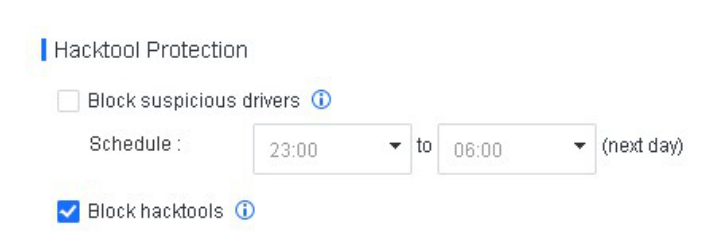
This feature can effectively block the defense evasion tactics that hackers employ during ransomware attacks, protecting endpoint users from ransomware.
-
Block suspicious drivers : Give alerts and block suspicious drivers' loading, running, and other behaviors during the specified scheduled period.
-
Block hacktools : Give alerts and block the loading, running, and other behaviors of untrusted drivers and hacktools.
WebShell Detection
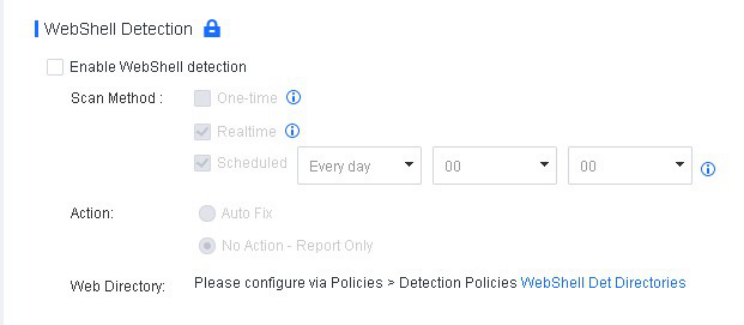
When this feature is enabled, you can specify a scan method and the action for detected web shells, as shown in the following figure.
Relevant parameters are described as follows:
Scan Method : Available options include One-time, Realtime, and Scheduled .
-
One-time : Scan the root directory and its subdirectories upon the first installation of the NovaGuard agent on an endpoint.
-
Realtime : Scan new files on an endpoint in real time.
-
Scheduled : Scan all files on an endpoint as scheduled.
Action: You can specify the action for detected web shells. Supported options include Auto Fix and No Action - Report Only .
Web Directory: You can configure the web shell detection directory, and it will be scanned by default. You can also specify a custom directory.
Note:
Web shell detection is available for Windows Server and Linux endpoints.
Brute-Force Attack Detection
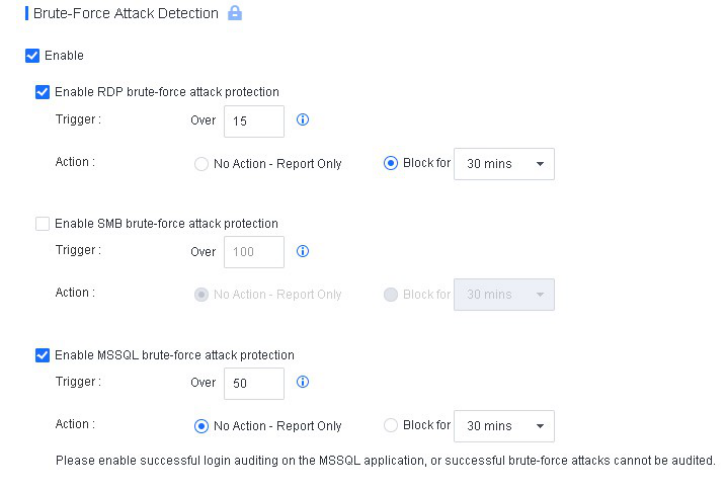
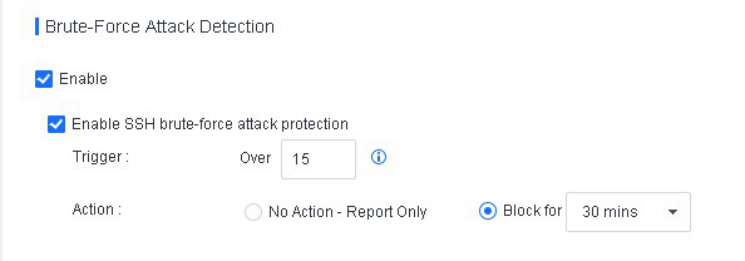
This feature detects and blocks RDP, SMB, Microsoft SQL Server, and SSH brute-force attacks. You can enable RDP, SMB, and Microsoft SQL Server brute force attack protection for Windows endpoints and SSH brute-force attack protection for Linux endpoints.
Settings for Windows endpoints are shown in the following figure.
Relevant parameters are described as follows:
-
Trigger: You can specify the threshold for identifying a quick brute-force attack. A brute-force attack is identified as a quick attack if the number of its consecutive attempts exceeds the specified value within a minute. For RDP and SMB quick brute-force attacks, you can specify an integer in the range of 1 to 100 and an integer in the range of 20 to 1,000, respectively. Slow and distributed brute-force attacks are identified based on an intelligent algorithm.
-
Action: For identified attacks, select No Action - Report Only or Block for specific minutes.
Note:
Enable successful login auditing on the Microsoft SQL Server application or successful brute force attacks cannot be audited.
Settings for Linux endpoints are shown in the following figure.
Relevant parameters are described as follows:
-
Trigger: You can specify the threshold for identifying a quick brute-force attack. A brute-force attack is identified as a quick attack if the number of consecutive attempts exceeds the specified value within a minute. You can specify an integer from 1 to 100 for SSH quick brute-force attacks. Slow and distributed brute-force attacks are identified based on an intelligent algorithm.
-
Action: For identified attacks, select No Action - Report Only or Block for specific minutes.
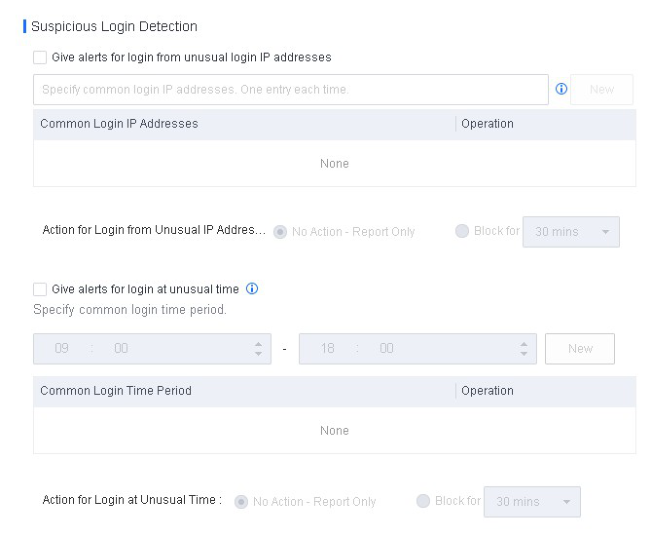
Suspicious Login Detection
NovaGuard can detect and automatically block logins at an unusual time or from uncommon IP addresses.
NovaGuard can detect suspicious logins on Windows endpoints (including PCs) via RDP and SMB and those on Linux endpoints via SSH.
Fileless Attack Protection
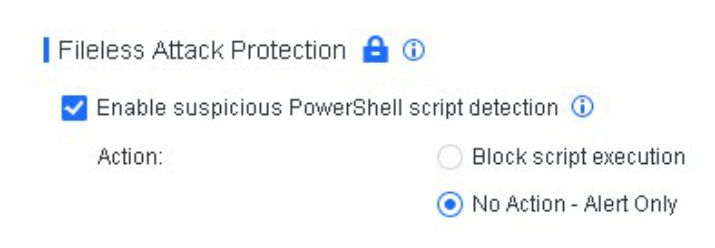
A fileless attack is an advanced technique employed by attackers to exploit vulnerable applications to inject code into the memory and normal system processes, such as the registry, PowerShell scripts, and Microsoft Office documents, aiming to gain access permissions and execute attack commands on target devices. Fileless attack protection enables the detection and handling of suspicious PowerShell scripts. The settings for this feature are shown in the
figure below:
Relevant parameters are described as follows:
Enable suspicious PowerShell script detection : This option takes effect only when Realtime File Protection is enabled.
Action : Available options include Block script execution and No Action - Alert Only (recommended). When suspicious PowerShell scripts are detected:
-
For PCs, NovaGuard generates alerts and suspends the scripts. Endpoint users can then allow or block the scripts.
-
For servers, NovaGuard generates alerts but does not suspend the scripts. Endpoint users can determine whether to block or ignore the scripts.
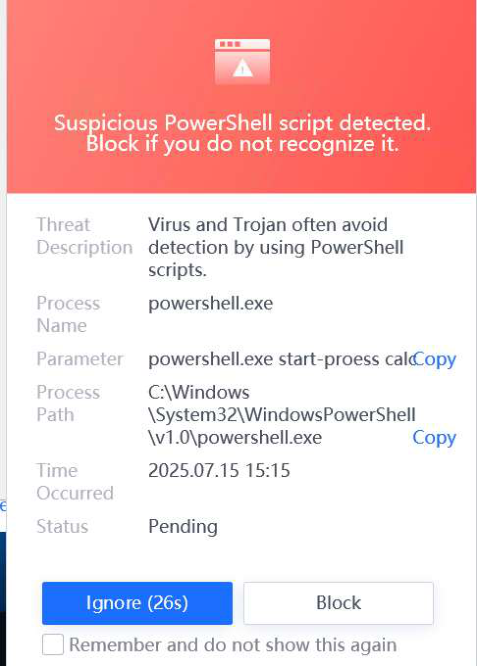
The following alert is generated when a suspicious script is detected.