

4.6.1.4.2 Scenario 2: Protect the Specified Directories
Protect critical endpoint directories and files from unauthorized access and modification.
Procedure :
Step 1. Perform an endpoint virus scan.
Perform a virus scan on the endpoint to ensure the operating environment is secure.
Step 2. Add directories.
Check Enable trusted process whitelist and select Specified Directory as Protected Objects . Manually add critical directories of the endpoint. Directories with a wildcard (*) or an environment variable are supported.
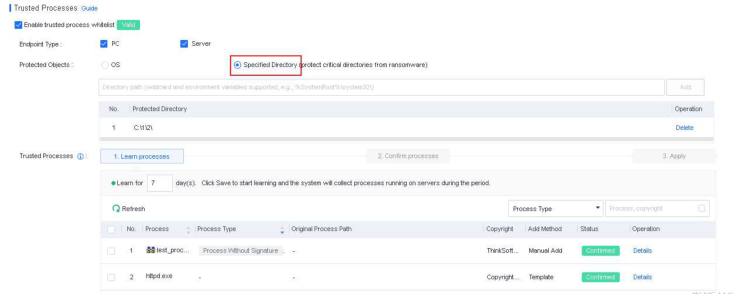
Step 3. Enable process learning and confirm trusted processes.
For details about the configurations, see 4.6.1.4.1 Scenario 1: Protect the System.
You can specify the action to take when an untrusted process is detected.

-
Prohibit Untrusted Process from: Untrusted processes cannot delete or modify protected directories. You can specify whether their access to protected directories is allowed.
-
Action: You can specify whether to block process operations or block process operations and terminate an untrusted process when the untrusted process performs operations on protected directories.
