

4.6.5.2 Application Signature Database
The application signature database provides default application signatures and supports custom application signatures.
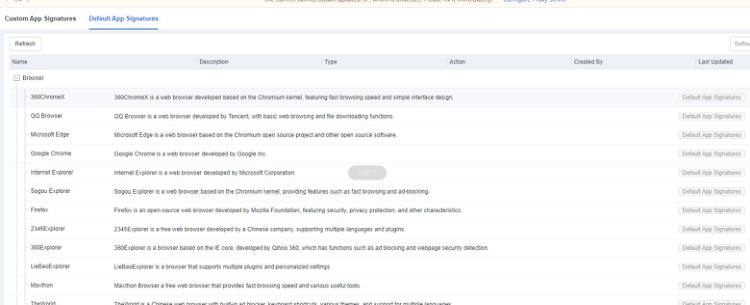
Suppose a required application signature is not included in the default application signature database. In that case, you can go to Policies - App Control - Application Signature Database and add the application signature, as shown in the following figure.
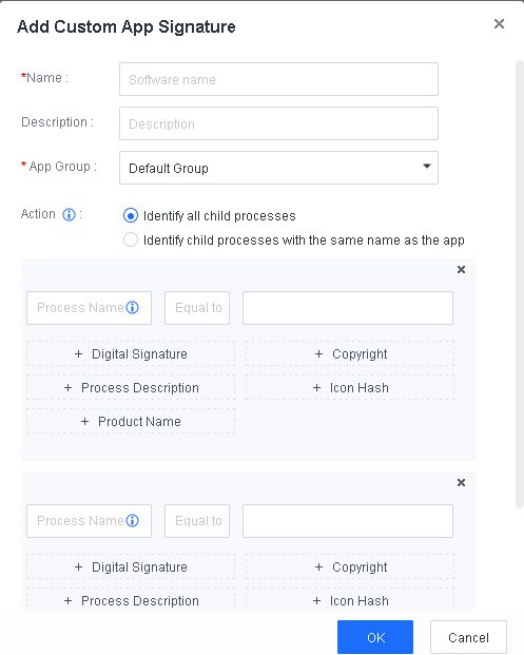
App Group : The group to which the custom application belongs.
Action : The scope of child processes identification. An application may have child processes whose names differ from the application name. We
recommend that you select Identify all child processes so that you can identify and terminate all child processes of an application.
You can identify a custom application using one or more application information groups. Each application information group consists of multiple fields, including Digital Signature, Copyright, Process Description, Icon Hash, and Product Name . You can click the corresponding button to add an information field. To add an application information group, click Add Another Group .
If the application has only one child process, you need to add only one application information group. Otherwise, you need to add multiple application information groups. Multiple information fields or an application information group must match to identify an application uniquely.
