

4.6.5.4 Software Uninstallation
Once you find a piece of non-compliant software on a managed endpoint, you can remotely uninstall the software. This is the last action in the software lifecycle management.
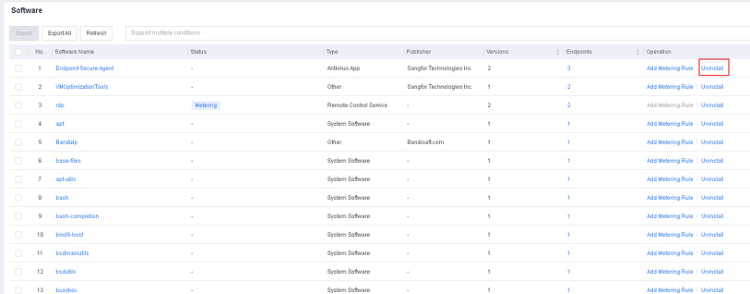
To uninstall the non-compliant software from all managed endpoints, go to Endpoint - Endpoint Inventory - Software and click Uninstall under the Operation column.
You can also click the software name to go to the details page, select an endpoint, and uninstall the software from only the selected endpoint.
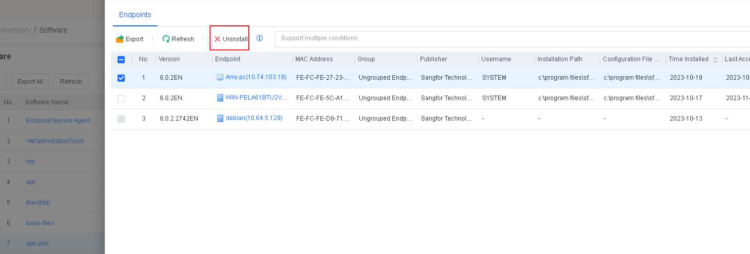
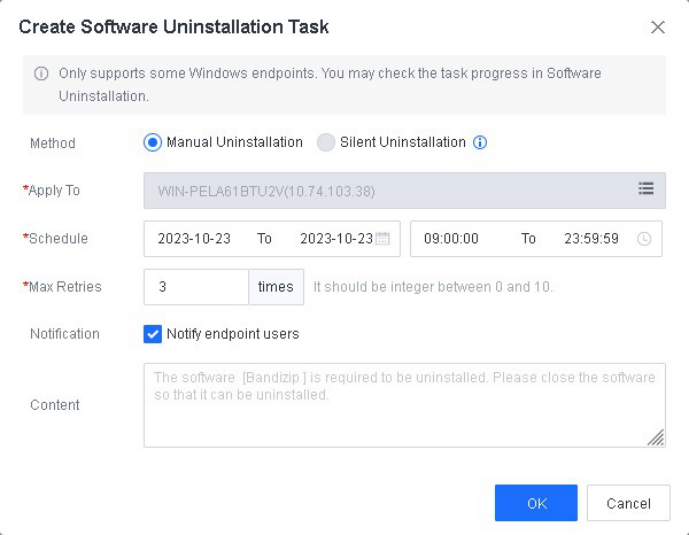
After you click Uninstall, you need to create an uninstallation task.
Manual Uninstallation : You can select this method to uninstall any software.
Silent Uninstallation : You can select this method to uninstall software that supports silent uninstallation.
Schedule : The task will be executed during the specified period.
Max Retries : If the task fails on the first try, it retries until the software is uninstalled from the endpoint or it meets the Max Retries, whichever comes first.
Notification : If you check this option, the endpoint user will be notified 5 minutes before and when the uninstallation starts.
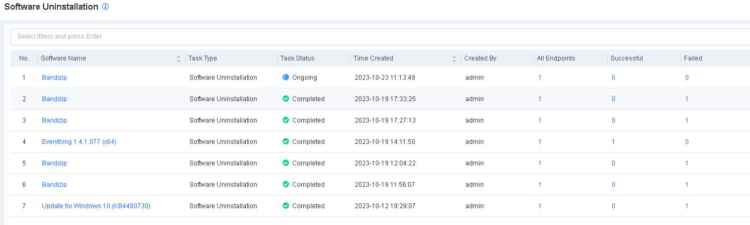
After you create an uninstallation task, you can go to Policies - App Control Software Uninstallation to check the task progress.
Note:
Software uninstallation is supported only for Windows 7 and above endpoints or Windows
Server version 2012 and above.
