

NovaGuard › Documentazione dei prodotti › NovaGuard 6.04R4 User Manual › 4.7.7.3 Operations Logs
4.7.7.3 Operations Logs
On the Operations Logs page, you can select Upload Script File, Remote Support, and LDAP Sync History from the Operation drop-down list to view three types of operations logs. The log information is displayed in columns such as Time, Endpoint Name, IP Address, OS, Type, and Status, as shown in the following figure.
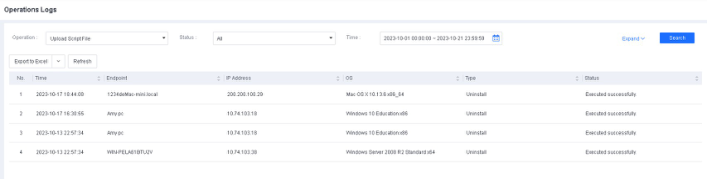
If you select Upload Script File, for example, you can filter logs by status and time, then click Expand to filter logs by script file name, endpoint name, and IP address. Once you have applied your filters, you can export the filtering results.

NovaGuard 6.04R4 Manual.pdfPDF · Inglese · 24,1 MB
Scarica