

4.7.7.6 Reports
Export a report
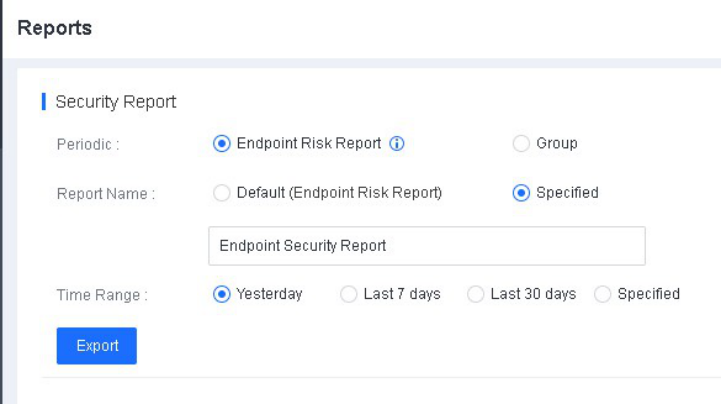
You can export risk reports of all managed endpoints from the NovaGuard manager for quick analysis and assessment of business and network security risks. When you export a report, you can specify its name and time range, as
shown in the following figure.
Subscribe to reports
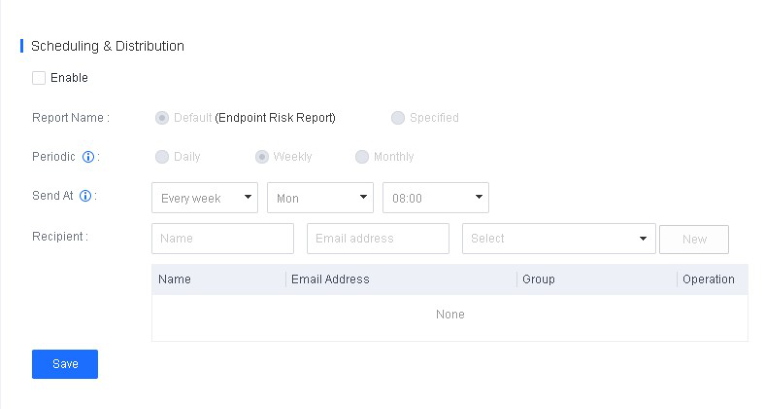
You can subscribe to risk reports. In the Scheduling & Distribution section, specify the report name, report type, sending time, and recipients, as shown in the following figure.
-
Periodic : Valid values are Daily, Weekly, and Monthly, which refer to reports during one calendar day (00:00 - 24:00), calendar week (Monday - Sunday), or calendar month (1st day to the end date of the month).
-
Send At : Specify the time when a security report will be sent to the recipients.
