4.2.2 Target Endpoints
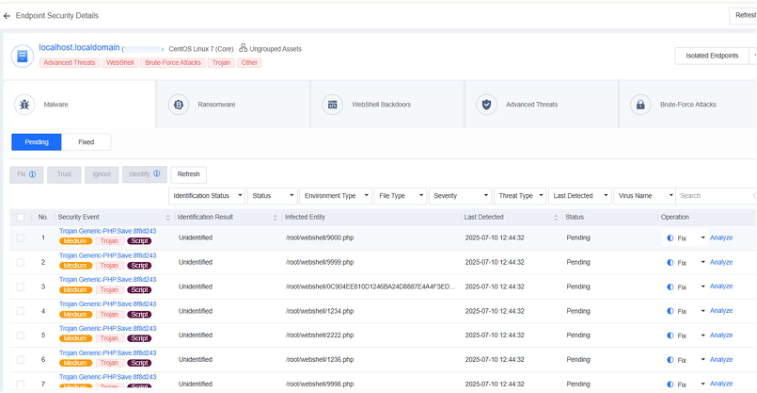
Go to Detection and Response - Target Endpoints and click Asset Alerts to view all risky endpoints. Click the name of an endpoint to enter the Endpoint Security Details page, where you can fix the relevant security events and isolate the endpoint, as shown in the figures below.
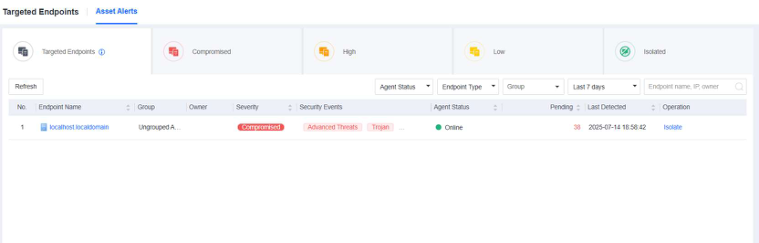
Risky endpoints are classified into the following three levels by severity:
-
Compromised : Endpoints involved in critical threats and high-severity viruses, threats, WebShell backdoors.
-
High : Endpoints involved in medium-severity viruses, threats, and brute force attacks.
-
Low : Endpoints involved in low-severity viruses, WebShell backdoors, and suspicious PowerShell executions.
You can filter endpoints by endpoint status, endpoint type, group, last detection time, endpoint name, or IP address as an administrator. For example, to fix security events for online endpoints only, you can filter endpoints by selecting Online for Endpoint Status .
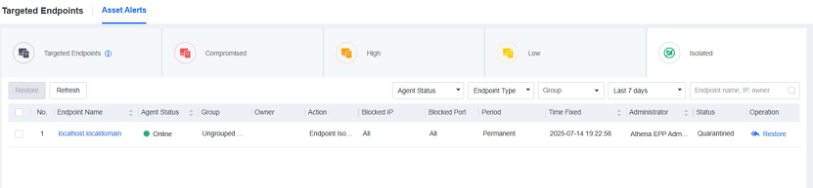
You can isolate a detected risky endpoint. An isolated endpoint is restricted from accessing any network, ensuring no impact on business assets. You can also restore an isolated endpoint, as shown in the following figure.