

NovaGuard › Product Documentation › NovaGuard 6.04R4 User Manual › 4.5.2.1 Listening Ports
4.5.2.1 Listening Ports
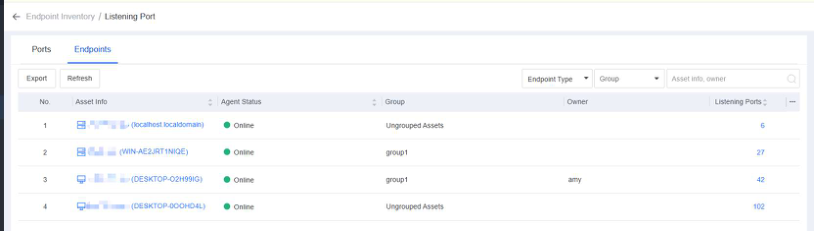
On the Listening Ports page, you can efficiently view and check open ports on all endpoints as an administrator to identify and address risky ports by server or host or from a holistic perspective, as shown below.
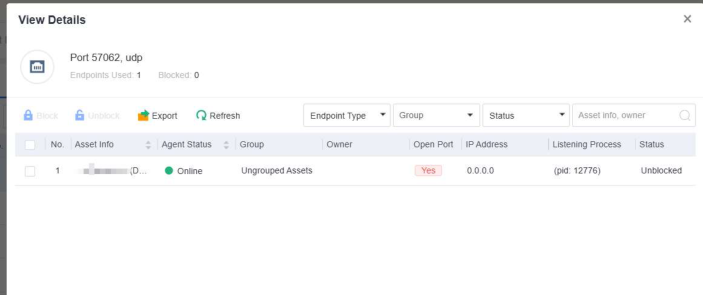
The Ports tab, where you can view the number of endpoints with a specific port open. To further analyze these endpoints, click the number in the Endpoints Used/Blocked column to go to the View Details page, as shown in the following figure.
Note:
Block Port : To block the port of an endpoint, select the endpoint and click Block Port . To
unblock the port of an endpoint, select the endpoint and click Unblock .
Export : To export the endpoint details in the form of a table for further analysis by
administrators, click Export .
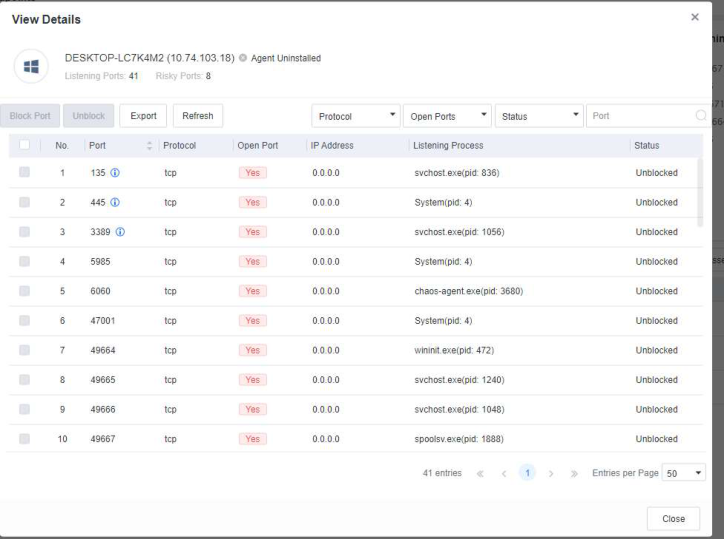
- In the Endpoints tab, you can view the number of listening ports, status, name, IP address, and group of each endpoint. To view the listening port details or block the listening ports as needed, click the number in the Listening Ports column, as shown in the following figure.

NovaGuard 6.04R4 Manual.pdfPDF · English · 24.1 MB
Download