

NovaGuard › Product Documentation › NovaGuard 6.04R4 User Manual › 4.5.3.1 Unmanaged Endpoints
4.5.3.1 Unmanaged Endpoints
The Unmanaged Endpoint tab displays unmanaged endpoints (without the NovaGuard agent installed) in the enterprise's internal network that are proactively detected, as shown in the following figure.
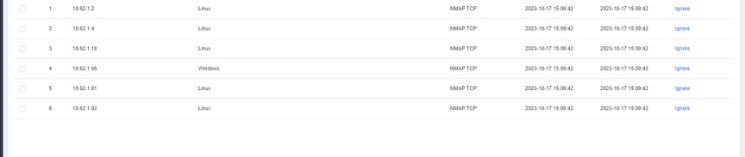
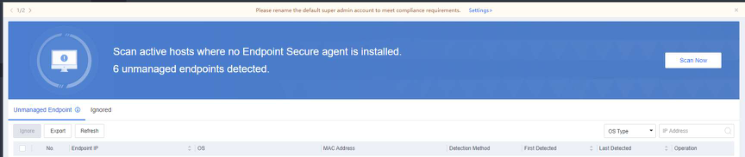
- Click Scan Now and set the following scan parameters to initiate a scan on the internal network:
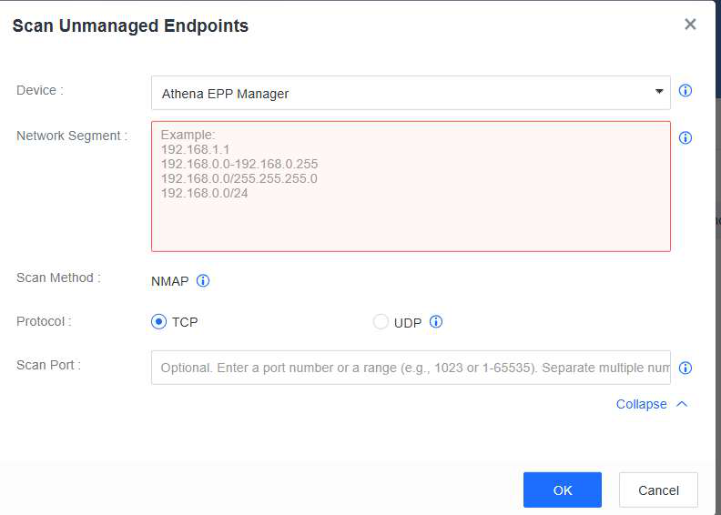
Device : Select NovaGuard manager or Endpoint . Only Linux endpoints with the NovaGuard agent installed can initiate the scan if Endpoint is selected.


Selecting multiple Linux endpoints with the NovaGuard agent installed is recommended to
expedite the large-scale scanning.
Network Segment : Specify IP addresses, IP ranges, IP addresses and netmasks in a network segment.


You can select a Protocol and specify a Scan Port in Advanced according to your needs.
- Click OK . In the OK dialog box, read the content to fully understand the risks and click OK to start the scan.

You can click Cancel to terminate the ongoing scan.
- After the scan, view the endpoints without the NovaGuard agent installed on the page. To export the endpoint information in the form of a table for further analysis by administrators, click Export or click Ignore to ignore it.

NovaGuard 6.04R4 Manual.pdfPDF · Language unconfirmed · 24.1 MB
Download