4.6.1.4.1 Scenario 1: Protect the System
Protect stable systems by preventing untrusted processes (such as unknown ransomware and other viruses) from running, ensuring security.
Procedure :
Step 1. Perform a virus scan.
Perform a virus scan on the endpoint to ensure the operating environment is secure.
Step 2. Enable process learning.
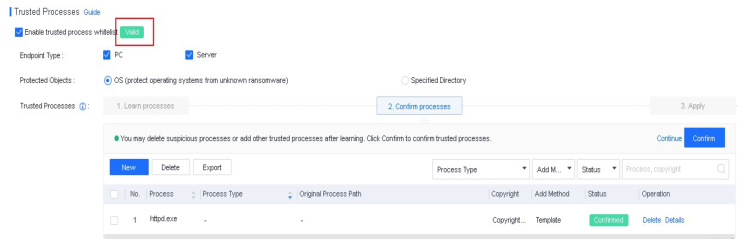
Check Enable trusted process whitelist and select OS as Protected Objects . Specify a time ranging from 1 day to 30 days for process learning and click Save, as shown in the following figure.
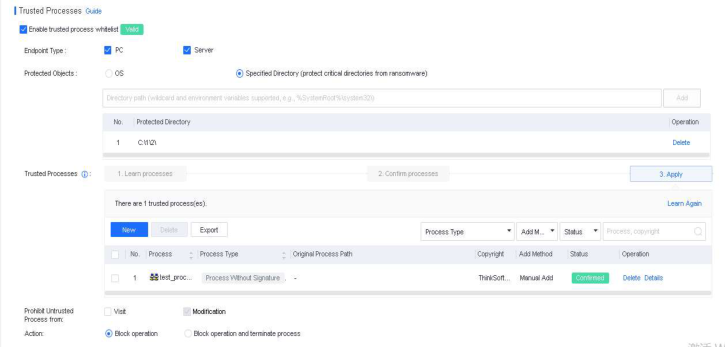
After the learning is complete, you can check the learned processes on this page and review the status of each process, including whether a process is flagged as suspicious or lacks a digital signature. This information can be a reference for confirming trusted processes in the next step.
Step 3. Confirm trusted processes.
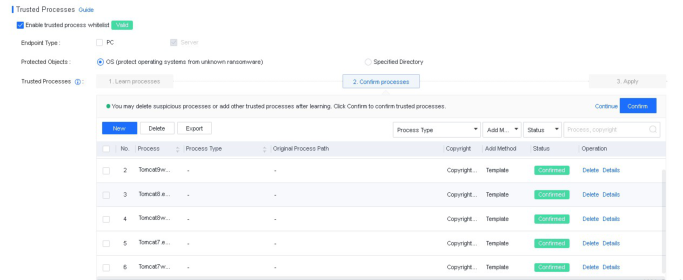
After the learning, you need to confirm trusted processes. By analyzing the results of process learning, you can remove untrusted processes and add trusted processes that were not learned, as shown below.
-
Process Type: NovaGuard identifies a process as a suspicious or system process.
-
Original Process Path: The path where the process file was initially reported.
-
Add Method: The method for adding the process, including Learning, Manual Add, and Template .
-
Status: The current status of the process. Unconfirmed means the process has not been confirmed as trusted.
-
Operation: You can delete, view process details, or analyze the process.
Note :
- If you find a trusted process not in the learning results, click New to add it. The page for adding a process is shown in the following figure.
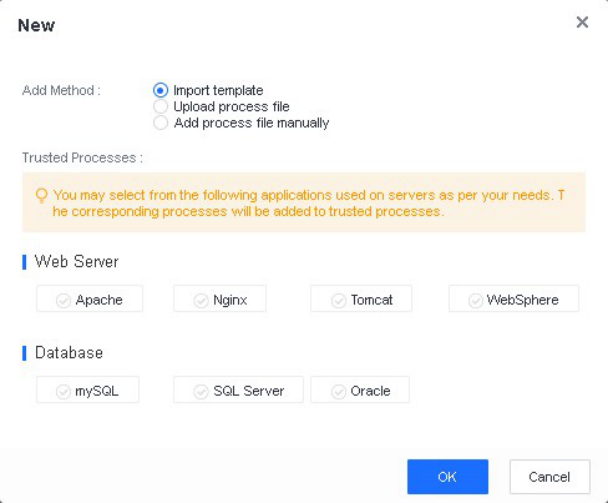
Add Method : Three methods are available for adding a process: Import template, Upload process file, and Add process file manually .
-
Import template: Applicable to scenarios where the endpoint that needs to be strengthened are the web servers or database servers provided in the template.
-
Upload process file: Upload a trusted process file to the endpoint.
-
Add process file manually: Collect the process name, original file name, and copyright of the trusted process, then manually enter the information.
After confirming the information, click OK to complete the setting.
Step 4. Apply trusted processes.
Click Save . You can find that endpoint protection is in effect, showing Valid .