

4.6.1.5 Trust List
This policy covers the Brute-Force Protection IP Whitelist and PowerShell Parameter Whitelist .
Brute-Force Protection IP Whitelist
Source IP addresses for brute-force attacks can be added to the whitelist on Windows or Linux endpoints. When false positive brute-force attacks are detected, you can add the source IP addresses to the whitelist. Then, IP addresses in the whitelist are allowed without triggering an alert.
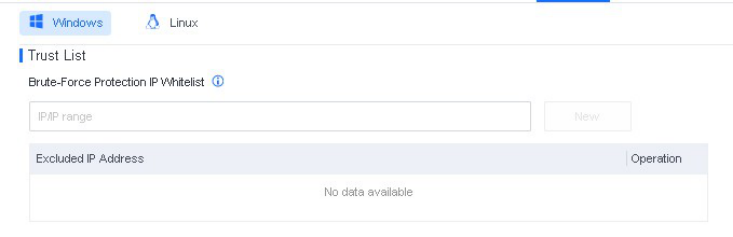
You can specify IP addresses, IP address ranges, or subnets for the Brute-Force Protection IP Whitelist . When false positive brute-force attacks are detected, you can add the source IP addresses to this whitelist. Then, IP addresses in the whitelist are allowed without triggering an alert.
PowerShell Parameter Whitelist
When O&M scripts written with PowerShell commands are detected, it is important to add the corresponding PowerShell parameters to the whitelist, as shown in the following figure.
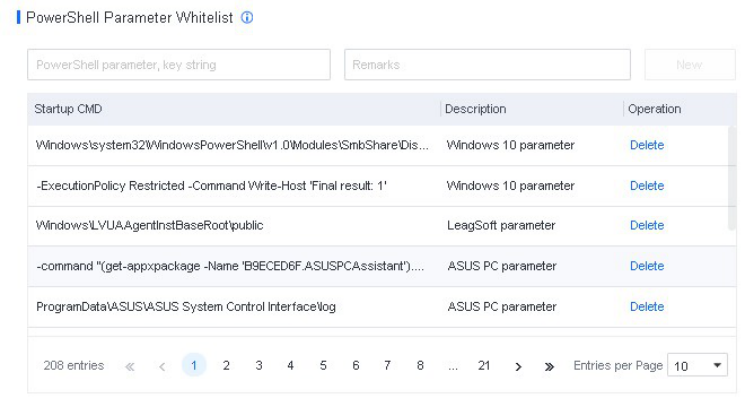
It ensures that false positives do not affect business operations.
Whitelist PowerShell parameters: When detected, PowerShell parameters listed in the whitelist are allowed to run. Partial string match is supported. For instance, the parameter powershell -ExecutionPolicy Restricted -Command Write-Host 'Final result:1' can be matched by full name or keywords, such as Command Write-Host 'Final result:1' .


It is recommended to enter parameters longer than 10 characters to avoid protection being
bypassed by attackers.
