

NovaGuard › Product Documentation › NovaGuard 6.04R4 User Manual › 4.6.4.1 Watermark
4.6.4.1 Watermark
The watermark feature prevents information leakage. You can specify the watermark text to trace the source based on the screenshots.
To configure watermark settings, go to Policies - Behavior Control Watermark, as shown in the following figure.
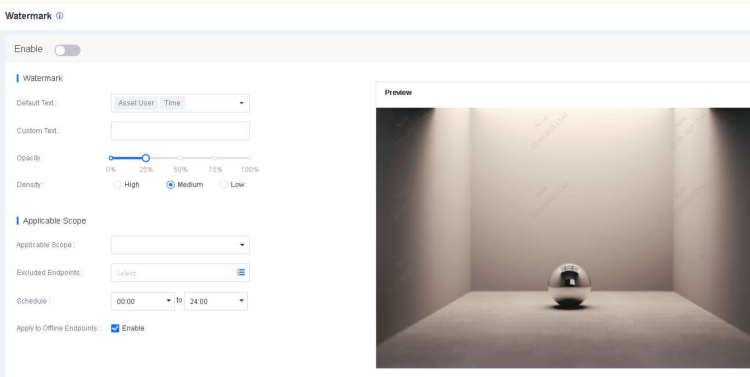
Watermark : Select one or more default text options or specify custom text for the watermark and set its opacity and density.
Applicable Scope : Specify the endpoints on which the watermark is displayed, the period when the watermark takes effect, and whether to apply the watermark to offline endpoints.
After you set a watermark parameter, you can view the result in real time in the Preview section on the right.

NovaGuard 6.04R4 Manual.pdfPDF · Language unconfirmed · 24.1 MB
Download