

4.7.6.1 License Types
NovaGuard provides essential and ultimate licenses, as shown in the following figure.

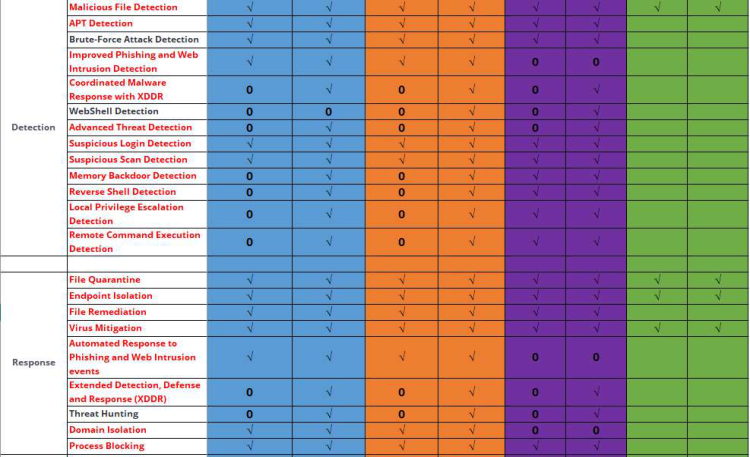
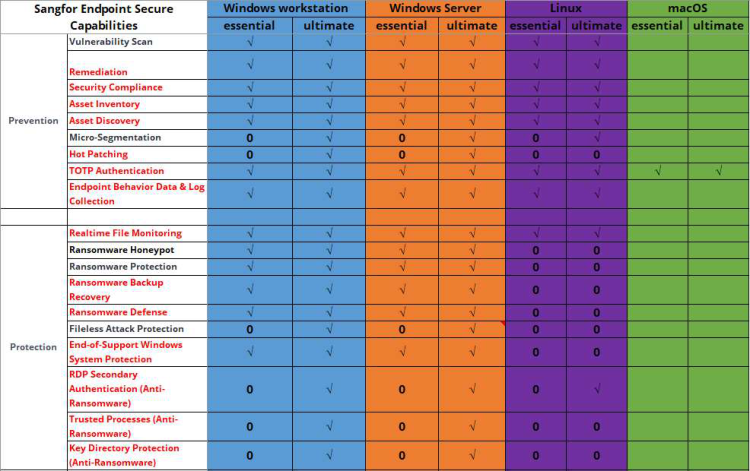
New deployment
An official license is activated through the ForeNova Licensing Server. To activate a trial license, contact the local sales team. For license activation methods, see Chapter 2.2 Product Activation .
Update/Renew License
A license can be activated twice. If a license is lost after the first activation, it can be activated again. The license information is related to the NovaGuard manager hardware. A change in the hardware information invalidates a license. License update/renewal is required in the following two scenarios:
1. A change in the NovaGuard manager hardware information
Go to System - Licensing and click Renew License, as shown in the following figure.
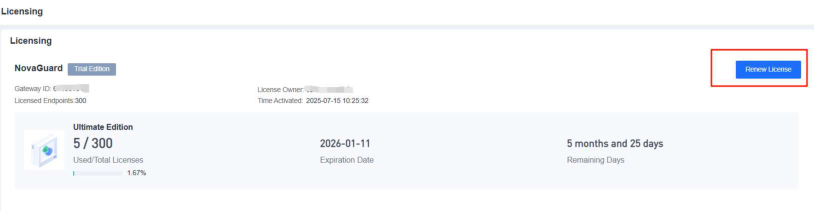
1. Migrate to a new server due to an NovaGuard manager fault
In this case, go to System - Licensing and import a new license, as shown in the following figure.
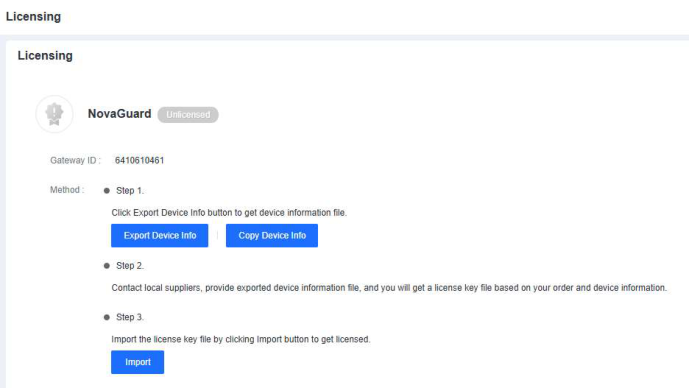


License expiration leads to the following results:
-
NovaGuard cannot be installed on a new endpoint.
-
NovaGuard and its databases cannot be updated.
-
Neural-X and Threat Analytics are disabled.
