

NovaGuard › Product Documentation › NovaGuard 6.04R4 User Manual › 4.7.8.1 Syslog Reporting
4.7.8.1 Syslog Reporting
On this page, you can sync the logs of NovaGuard to a syslog server over the syslog protocol, as shown in the following figure.
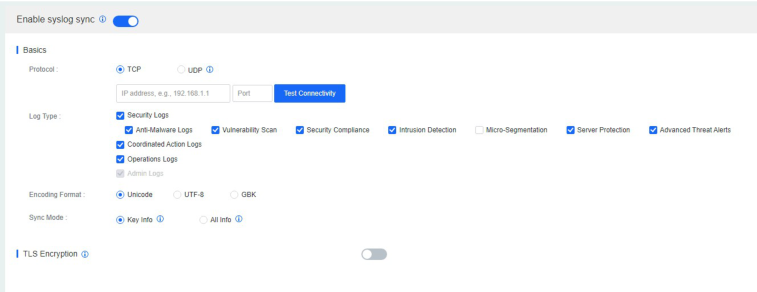
Protocol : First, select the protocol supported by the syslog server. Most syslog servers support the UDP protocol. Then, specify the IP address and port of the syslog server.
Log Type : Select the types of logs to be synced to the syslog server.
Encoding Format : The Unicode, UTF-8, and GBK formats are supported.
Sync Mode : If you select Key Info, only a few log fields will be synced. This mode is suitable for log retention of the Multi-Level Protection Scheme (MLPS). If you select All Info, all log fields will be synced. This mode is suitable for a comprehensive security log analysis after synchronization.

NovaGuard 6.04R4 Manual.pdfPDF · Language unconfirmed · 24.1 MB
Download