6.1 Installation and Deployment
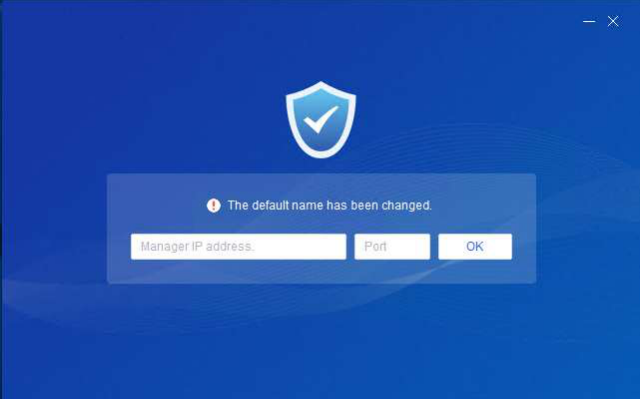
1. What can I do if the following alert appears during the installation?
Solution:
This alert indicates that the installer file has been renamed. You can enter the IP address of the NovaGuard manager and port number 443 in the text boxes to continue, or you can re-download the installer. Note that you cannot rename the installer.
2. What can I do if the following message is displayed during the installation: Installation failed. Some file is missing. Please exit or uninstall the existing security software first.
Solution:
Uninstall other security software from your computer and try again.
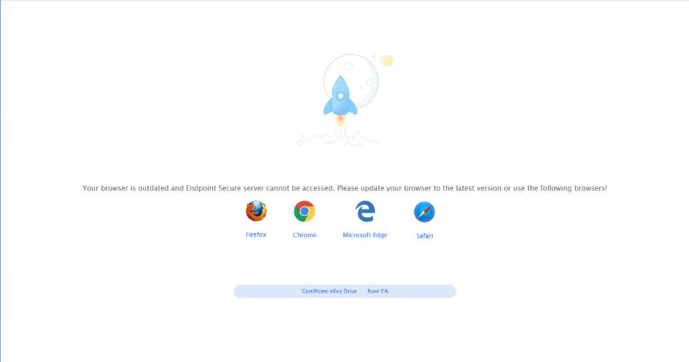
3. I cannot access the NovaGuard manager web console on Internet Explorer. The message is displayed in the following figure.
Solution:
This message indicates that your Internet Explorer is outdated. We recommend that you use Internet Explorer 11 or other up-to-date browsers.
4. What can I do if the antivirus database cannot be automatically upgraded?
Solution:
Ensure you have configured the correct IP address, gateway, and DNS settings for the NovaGuard manager, and your endpoint can access download.forenova.com.
5. What can I do if errors occur after the NovaGuard agent is installed on an endpoint?
Solution:
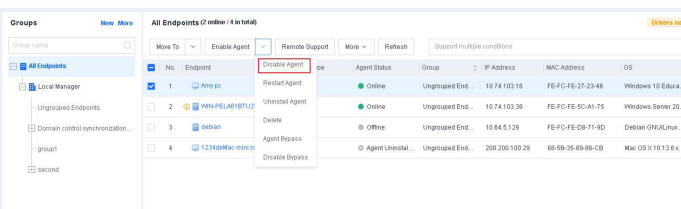
Log in to the NovaGuard manager. Go to Endpoint > Endpoint Groups and disable the NovaGuard agent on the endpoint, as shown in the following figure. If the errors persist after the NovaGuard agent is disabled, contact your service provider.